
Need to get rid of lab equipment?
Follow the steps below to send items to UF Asset Management (Surplus). This process applies to all lab equipment — whether or not it has a UF decal.
⚠️ Do not leave items on the loading dock or in the hallway. MCS staff will coordinate pickup — see Step 3.
Quick Rule: Decaled vs. Non-Decaled Items
- Items with a UF decal (AT… or 000… tags) — must go through UF Surplus. You cannot throw these away.
- Items without a decal — disposal is at the PI’s discretion, but lab items still require decontamination before removal.
Not sure what kind of decal your item has? See the decal guide below.
Step 1 — Complete a Decontamination Form
Any equipment that has been in a lab must have an approved EHS decontamination form before it can be moved.
➡️ Submit a UF EHS Decontamination Form
Wait for EH&S to mark your form “APPROVED” before proceeding to Step 2.
Step 2 — Remove Refrigerant (only if applicable)
Skip this step if your item does not contain coolant.
Refrigerators, freezers, and some thermocyclers contain refrigerants that must be professionally removed before surplus pickup.
- Submit a work order to IFAS Facilities to schedule refrigerant removal.
- Print the Refrigerant Removal Form for IFAS Facilities to complete on-site.
- Affix the completed form to the equipment and attach a photo or scan of it to your decontamination form from Step 1.
- Complete a separate EHS decontamination form for this item if you haven’t already.
Step 3 — Submit a Pickup Request to MCS Staff
Once your decon form is approved (and refrigerant is removed, if applicable), let MCS staff know the item is ready.
➡️ Submit the Surplus Equipment Pickup Request Form
MCS staff will follow up to either pick up small items from you directly or schedule Asset Management to retrieve larger items from their current location.
Do not bring items to the main office or leave them on the loading dock unless instructed to do so.
What Surplus Will and Won’t Accept
| ✓ Accepted | ✗ Not Accepted |
|---|---|
| Any item with a UF decal (AT… or 000…) — these must go to Surplus | Lab equipment without an approved EHS decon form |
| Unopened, unused single-use items (e.g., sealed Kimwipes) | Opened single-use items or anything with potential biological/chemical contamination (e.g., opened reagents) |
| Decontaminated reusables (e.g., clean glassware, hot plates) | Appliances with refrigerants that haven’t been removed (e.g., refrigerators, some thermocyclers) |
Trash (Landfill)
Bag all trash and place it in the department dumpster at the end of the driveway outside Room 1025. Items with UF decals may not go in the dumpster.
Recycling
- Cardboard: Use the large recycling bin near the loading dock (Room 1025).
- Bulk wood, metal, and oversized items: Drop off at UF Asset Management/Surplus, which has bins for bulk materials. You may use a department vehicle to transport items there.
Understanding UF Decals
Three types of decals appear on department equipment:
| Decal | Description | Tracked by MCS? |
|---|---|---|
| White/Blue — “AT…” | Attractive Asset | Yes — report to MCS staff |
| Orange/Green — “000…” | Capital Asset | Yes — report to MCS staff |
| White — “W…” | UF Surplus internal tracking (“W number”) | No — not tracked by our department |
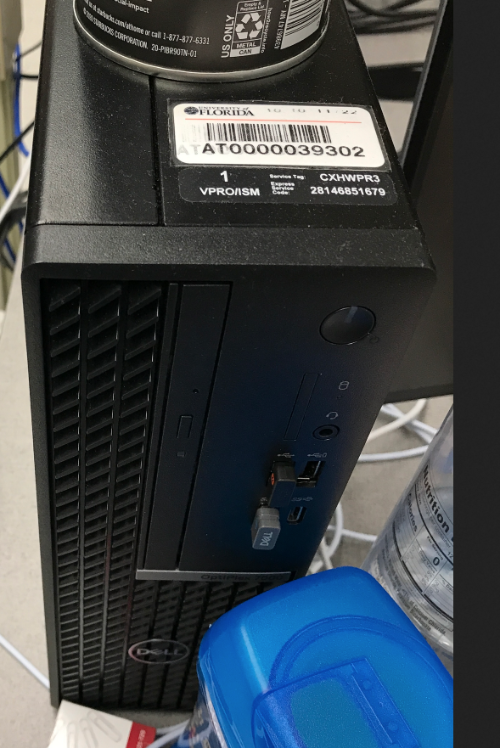
image of white attractive asset decal. the decal number begins with "AT..."
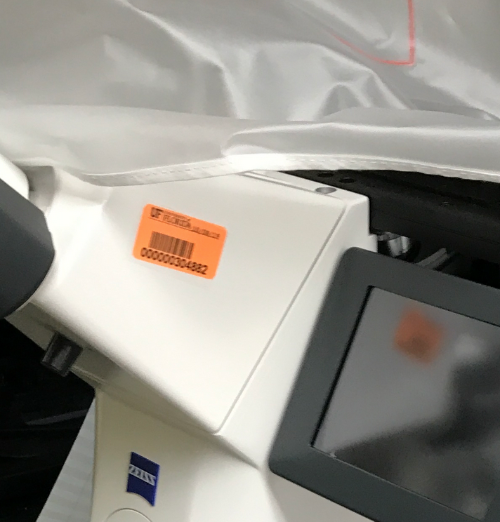
image of orange capital asset decal. the decal number begins with "000..."
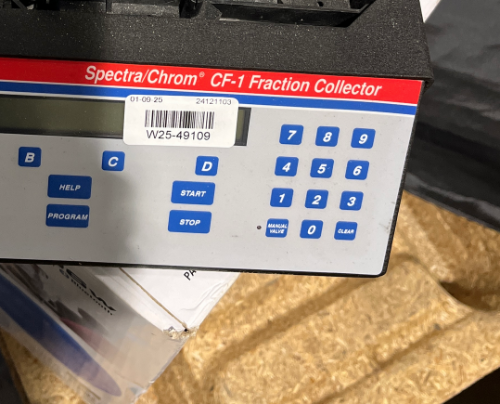
image of a white warehouse tag or "W number".